

Components
What are the different types of ad extensions?
Components are content elements that complement your ad with useful information about your business, making users even more likely to choose you. They include headlines, descriptions, links to specific sections of your website, call buttons, location information, and more.
Together, they make up the final ad format presented to the user.
To optimize the performance of your responsive ads on the Search Network, Google Ads chooses which additional components to show in response to each Google search. That is why we recommend using all components that fit your business goals.
Adding additional components to your campaign does not incur any extra cost.

Best practices deck
Performance Max
What is it?
Performance Max is a goal-based campaign type that lets performance-focused advertisers access their entire Google Ads inventory from a single campaign. It complements keyword-based Search Network campaigns to help you increase conversions across all Google channels (YouTube, Display, Search Network, Discover, Gmail, Maps, etc.).
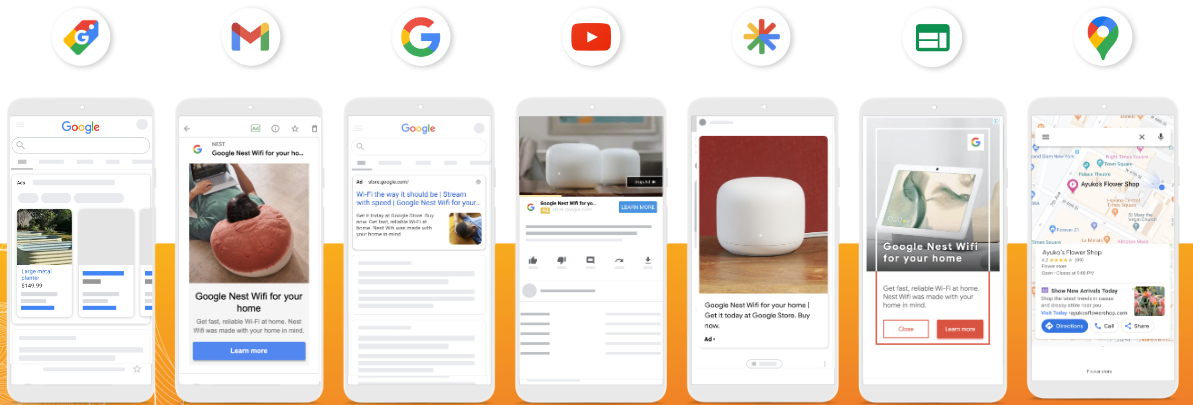
Best practices for Performance Max
Performance Max relies on the conversion goals you specify to help you generate more conversions and value, optimizing your performance in real time across all channels through Smart Bidding strategies.
Performance Max uses Google AI for bidding, budget optimization, audiences, creatives, attribution, and more.
All of these features are guided by your advertising goal (for example, the target CPA or ROAS you set), as well as the creative assets, audience signals, and optional data feeds you provide.
Text specifications
Text
| Type | Maximum length | Quantity | Required |
|---|---|---|---|
| Headlines | 30 characters | 3 to 15 headlines, recommended: 11 | ✓ |
| Long headline | 90 characters | 1 to 5 headlines, recommended: 2 | ✕ |
| Descriptions | 90 characters | 1 to 5 descriptions, recommended: 4 | ✓ |
| Business name | 25 characters | 1 name | ✓ |
| Call to action | Automated | 1 call to action | ✓ |
| Final URL | 2048 characters | 1 URL | ✕ |

Full specs
Image specifications:
Images
| Ratio | Recommended size | Quantity | Required |
|---|---|---|---|
| Landscape 1.91:1 | 1200 x 628 pixels (minimum 600 x 314 px) | 1 to 20 images, recommended: 4 | ✓ |
| Square 1:1 | 1200 x 1200 pixels (minimum 300 x 300 px) | 1 to 20 images, recommended: 4 | ✓ |
| Logo 1:1 | 1200 x 1200 pixels (minimum 128 x 128 px) | 1 to 5 images, recommended: 1 | ✓ |
| Logo 4:1 | 1200 x 300 pixels (minimum 512 x 128 px) | 1 to 5 images, recommended: 1 | ✕ |
| Portrait 4:5 | 960 x 1200 pixels (minimum 480 x 600 px) | 1 to 20 images, recommended: 2 | ✕ |
Upload images in .jpg or .png format with a maximum size of 5 MB. Some images are optional, but they will help your campaign stand out with strong ad performance.
Full specs
Videos
| Ratio | Recommended size | Quantity | Required |
|---|---|---|---|
| Landscape 16:9 | 10 seconds or more | 1 to 5 videos, recommended: 1 | ✕ |
| Square 1:1 | 10 seconds or more | 1 to 5 videos, recommended: 1 | ✕ |
| Portrait 9:16 | 10 seconds or more | 1 to 5 videos, recommended: 1 | ✕ |
If you do not add a video to your Performance Max asset group, one or more videos may be generated automatically from the assets in your asset group. If you do not have a video asset and do not want to use auto-generated videos, you can use the Google Ads video creation tool to create a video for your Performance Max campaign. Learn how to create a video using the asset library.
Full specs